axios npm Supply Chain Attack:
How We Scanned 4 Live Servers (Case Study)
axios npm Supply Chain Attack
Earlier today – March 31, 2026 – an unknown threat actor compromised the npm account of an axios maintainer and published two malicious package versions: [email protected] and [email protected]. axios is the most downloaded HTTP client in the JavaScript ecosystem, with over 100 million weekly installs, making this one of the most significant npm supply chain incidents to date.
At The Orange Club, we manage Node.js infrastructure across multiple production VPS environments for our clients. The moment the advisory dropped, we ran a systematic scan across every server. This post documents exactly what we did, what we found, and what you should do right now.
What Happened — The Attack Explained
The attacker changed the maintainer’s account email to an anonymous ProtonMail address and manually published the poisoned packages via the npm CLI, deliberately bypassing the project’s GitHub Actions CI/CD pipeline. A malicious dependency called plain-crypto-js was staged 18 hours in advance, and both release branches were poisoned within 39 minutes of each other.
What the malicious payload does
The injected package includes a dropper (setup.js) that:
- Downloads platform-specific second-stage payloads from a C2 server at
sfrclak.com:8000 - Installs a lightweight Remote Access Trojan (RAT) that beacons every 60 seconds
- Transmits full system inventory, environment variables, and API keys
- Enables remote shell execution, binary injection, directory browsing, and process listing
- Self-cleans by deleting itself and restoring a clean
package.jsonto avoid detection
The malicious versions were removed from npm within a few hours, but axios’s presence in roughly 80% of cloud and Node.js environments enabled rapid exposure before takedown.
Tracked as: GHSA-fw8c-xr5c-95f9 · MAL-2026-2306
Also affected: @shadanai/openclaw versions 2026.3.31-1 and 2026.3.31-2, and @qqbrowser/[email protected]
How We Scanned Our Servers — Step by Step
We manage four production VPS environments. Here is the exact workflow we ran on each, starting from root.
1. Check for C2 connections and DNS activity
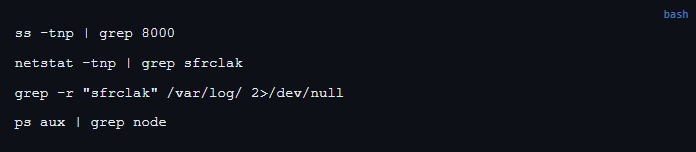
Before touching npm, we checked whether the RAT was already running and beaconing home. These commands run system-wide from root:
2. Check npm install logs for the exposure window
Review logs for any installs that pulled the bad versions during the attack window (March 31, 2026 UTC):

3. Find all projects with axios
Run this from the web root (or home directory) to locate every project that references axios:

4. Check the installed version in each project
For every project found in step 3, run from within that directory:

You’re looking for 1.14.1 or 0.30.4. Anything below 1.14.x is safe.
Pro tip: Run the C2/process checks once from root they’re system-wide. Run npm list axios per app directory; each project has its own node_modules and the bad version could exist in one but not another.
Remediation — If You’re Affected
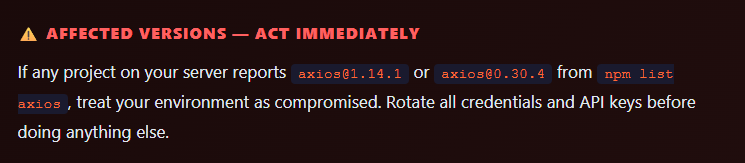
If you found [email protected] or 0.30.4, follow this sequence exactly:
1. Rotate credentials first
The RAT reads environment variables on first execution. Assume everything in your .env files, shell environment, and secrets manager has been exfiltrated. Rotate AWS keys, database passwords, API tokens, and any other credentials immediately — before remediation.
2. Downgrade and clean
npm install [email protected] –save-exact rm -rf node_modules package-lock.json npm cache clean –force npm install
3. Check for persistence
# Unusual cron jobs
crontab -l
cat /etc/cron.d/*

# New or unknown systemd services
systemctl list-units --type=service --state=running

# Files dropped in temp directories
ls -la /tmp /var/tmp

# Monitor outbound traffic
ss -tnp | grep ESTABLISHED
4. Block the C2 at firewall level
iptables -I OUTPUT 1 -d sfrclak.com -j DROPOur Findings — 4 Servers, Zero Compromise
Here is what we found across the four production environments we manage:
| Server | App Type | axios Version Found | Status |
|---|---|---|---|
| Production VPS #1 | Web Application | 1.13.2 | ✅ Clean |
| Production VPS #1 | Web Application | not installed | ✅ Clean |
| Production VPS #2 | Automation / Workflow Platform | 1.8.2 / 1.8.3 / 1.9.0 | ✅ Clean |
| Production VPS #3 | Frontend Application | 1.12.2 | ✅ Clean |
| Production VPS #4 | Frontend Application (staging + prod) | 1.12.2 | ✅ Clean |
| Production VPS #4 | Frontend Application (dev) | 1.10.0 | ✅ Clean |
| Mail Server | — | not present | ✅ Clean |
No C2 connections, no DNS lookups to sfrclak.com, and no malicious axios versions found across any environment. All versions were well below the compromised 1.14.x range. None of our clients were impacted.
Best Practices to Prevent Supply Chain Attacks
This incident is a reminder that a single compromised dependency in a widely-used library can become a vector into your entire server environment. Here’s what we recommend:
- Pin exact dependency versions in
package.jsonusing--save-exactand commit your lockfile - Run
npm auditoryarn auditon every deployment as part of your CI/CD pipeline - Isolate applications with Docker or separate OS users to prevent lateral movement between apps on the same VPS
- Monitor outbound connections and set firewall alerts for unexpected traffic on non-standard ports
- Rotate credentials regularly and use short-lived tokens where possible (AWS IAM, GitHub fine-grained tokens)
- Subscribe to security advisories for your critical dependencies via GitHub Dependabot or the npm security feed
- Whitelist allowed outbound IPs at the firewall level — your Node.js app rarely needs to call arbitrary internet hosts
Learning moment: Even a single compromised package in one Node.js app can cascade into a full server breach if apps share the same environment and the attacker gains a shell. Isolation is the highest-value control you can implement today.
Daily and Weekly Security Checks
uptime
ps aux –sort=-%cpu | head -10
ss -tnp | grep ESTABLISHED
find /tmp -maxdepth 1 -newer /tmp -type f 2>/dev/null
Weekly:
npm audit –audit-level=high
find . -name “package-lock.json” | xargs grep -l “axios”
crontab -l && cat /etc/cron.d/*
systemctl list-units –type=service –state=failed
Summary
The axios npm supply chain attack on March 31, 2026 is a wake-up call for every team running Node.js in production. The attacker bypassed CI/CD entirely by compromising a maintainer’s npm account directly, which is a vector that dependency auditing alone cannot catch.
We scanned all four of our production VPS environments within the hour and confirmed zero exposure. If you haven’t checked yet, the single command you need right now is:
find . -name "package-lock.json" | xargs grep -l "axios" 2>/dev/nullRun it from your web root or home directory, then check each result with npm list axios. If anything shows 1.14.1 or 0.30.4 — rotate credentials immediately and remediate.
About The Orange Club: The Orange Club is a Dubai-based agency specializing in high-performance web development, with deep expertise in Next.js, React, and modern full-stack JavaScript ecosystems.
We build, manage, and secure applications for clients across diverse industries, giving us a front-row seat to emerging vulnerabilities like today’s axios incident — and the operational experience to respond within the hour.
If you need a security review of your Node.js infrastructure or want to discuss how to harden your VPS environments, get in touch.
Leave a Reply